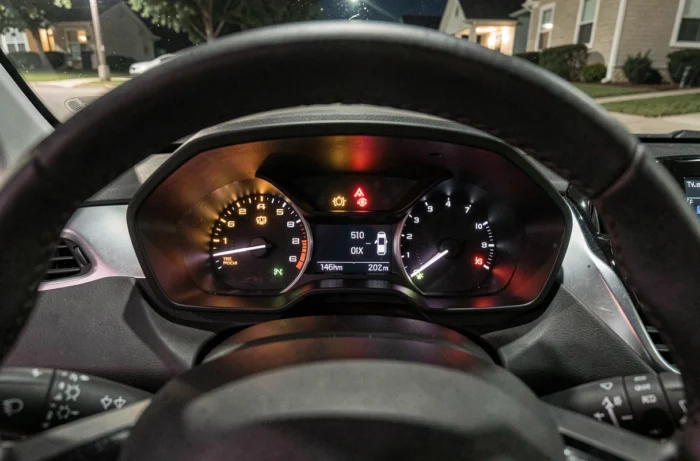
A bright symbol appears on the dashboard of your Peugeot 208 while you are driving. Your first instinct is to look up its meaning, and that’s the right approach. The dashboard lights of the Peugeot 208 function like a visual language coded by colors, but interpreting them goes beyond just spotting red or orange. The combination of the displayed light and the accompanying message on the screen radically changes the diagnosis.
STOP Light on Peugeot 208: Why It’s Not Enough on Its Own
Most guides simply state that red means stop. This is true, but incomplete. On the 208, the STOP light is a general indicator that is always accompanied by a second symbol. This second symbol specifies the source of the problem: oil, temperature, braking, or charge.
Do you see the STOP light turning on by itself, with no other visible icon? Check the digital display. A text message there specifies the nature of the alert. The key information to remember before turning off the engine is this exact combination: light plus displayed message.
Specifically, a STOP light associated with the oil pressure icon indicates a risk of engine failure in the very short term. The same STOP light accompanied by the temperature gauge indicates overheating. Both require a quick stop, but the actions differ: in the first case, turn off the engine immediately; in the second, let it idle for a moment so that the coolant continues to circulate before turning off the ignition.
To find a detailed explanation of the Peugeot 208 dashboard lights according to each icon, noting the exact combination remains the first useful step before heading to the garage.

Orange Lights on the Peugeot 208: Those That Require Quick Diagnosis
Orange indicates an anomaly that does not require an immediate stop but needs to be checked within a few days. Two orange lights appear more frequently than others on the 208, and their actual severity varies greatly.
Orange Engine Light (Injection)
The orange engine light is the most common and ambiguous alert. It can signal a simple issue with a faulty lambda sensor or a more serious injection problem. On PureTech engines, this light sometimes appears after refueling if the fuel cap is not properly closed.
If the light remains steady, you can continue driving cautiously to the garage. If it blinks, the situation is different: a blinking engine light generally indicates combustion misfires. Driving under these conditions risks damaging the catalyst.
Tire Pressure Light (TPMS)
This light, shaped like an exclamation point inside a stylized tire, lights up when the pressure of a tire drops below the programmed threshold. It also activates after a wheel change if the sensors have not been reset. Check the pressure when cold before driving further, as under-inflation affects braking and increases fuel consumption.
Specific Lights for the e-208 Electric: A Different Dashboard
Have you noticed that the e-208 displays symbols that are absent from the thermal versions? This is normal: the electric motor generates its own alerts, and transposing the diagnosis from a gasoline 208 to an e-208 leads to errors.
The e-208 may display a turtle when the available energy becomes very low. This icon means a voluntary reduction in power to preserve the high-voltage battery. It is not a breakdown, but a degraded mode. The car remains usable, at reduced speed, until you reach a charging station.
Other specific alerts concern:
- The cooling of the battery pack, which can trigger an orange light if the internal temperature exceeds normal thresholds, especially in high heat or after prolonged fast charging.
- The onboard charger, which can generate an alert if charging is interrupted abnormally. In this case, the light appears after a charging session and not while driving.
- The 12V auxiliary battery, distinct from the traction battery, which powers the onboard electronics. Its light resembles that of a conventional battery, but its failure can prevent the electric vehicle from starting.
To correctly identify the source of a light on the e-208, ask yourself a simple question: Did the light appear during charging, after an interrupted charge, or while driving? This distinction directs the diagnosis toward the onboard charger or the traction system.

Reacting to an Illuminated Light: Concrete Actions Based on Color
Rather than an exhaustive list of icons, here are the reflexes to adopt based on the actual situation.
| Situation | Immediate Action | Time Before Diagnosis |
|---|---|---|
| Steady red light + STOP | Stop the vehicle, note the second symbol and the screen message | Immediate, do not restart without advice |
| Blinking red light | Reduce speed, turn off accessories, head to a garage | Within the hour |
| Steady orange light | Continue cautiously, avoid long trips | Within a few days |
| Blinking orange light (engine) | Reduce RPM, avoid acceleration | Within the day |
| Green or blue light | No action, function active (lights, cruise control) | None |
A point often overlooked: take a picture of the dashboard when the light is on. The lights may turn off after a restart, and the mechanic needs to know exactly which symbol was displayed to guide his electronic diagnosis.
On the second-generation 208, the digital display sometimes shows a message without an associated light. These text messages are as important as an icon. Read them in full before dismissing them on the touchscreen.
The best habit is to observe the initial test at startup: all lights briefly illuminate and then turn off. If one of them persists after a few seconds, it is a signal for a check to be scheduled, even in the absence of any noticeable symptoms while driving.